CAD/CAM Dental Crown & Bridge Design Service
- Delivery time
- Overnight turnaround
- Revisions
- Included until approved
- Software
- exocad
- Delivers
- STL file
DM Dental Design is a remote CAD/CAM crown design service for dental laboratories and clinics. Send the scan of the preparation and antagonist, and we return a milling- or printing-ready crown design: accurate margins, balanced occlusion and anatomy matched to the neighbouring teeth. We design zirconia crowns, lithium disilicate and PMMA crowns, implant crowns, full-contour and layered bridges.
By outsourcing CAD/CAM crown design to an experienced partner, you streamline your workflow, reduce chairside adjustments and deliver consistent restorations to your patients — without building an in-house design department.
What we focus on in every crowns & bridges case
Marginal adaptation. Accurate margins that seat without grinding.
Occlusal contacts. Balanced contacts checked against the antagonist.
Anatomy. Natural morphology matched to the neighbouring teeth.
Proximal contacts. Correct tightness for comfortable flossing.
Emergence profile. Optimised for soft tissue health and cleaning.
Our step-by-step process
- 1
Submit your scanned case files and instructions.
- 2
We produce the digital design and send it for review.
- 3
After approval we deliver the final files.
- 4
You receive the stl file — ready for production.
How CAD/CAM crown and bridge design works
A CAD/CAM crown starts from an intraoral or model scan. Once the preparation is scanned, the margin line is drawn on the digital die, the insertion axis is defined and the software calculates the internal geometry: cement gap, spacer start and minimum wall thickness for the chosen material. Those parameters are what decide whether the restoration seats without chairside grinding, so they are set per material rather than left on a generic default.
The external anatomy is then built. For a single unit we match morphology, ridge direction and surface texture to the neighbouring teeth; for bridges we add connectors sized for the span and the material, and shape pontics so they contact the ridge in a way that can be cleaned. Occlusion is checked against the scanned antagonist, and static and dynamic contacts are adjusted before the file is exported.
The result is a milling- or printing-ready STL. Zirconia, lithium disilicate, PMMA and metal frameworks each get their own parameter set, because a design that mills well in zirconia will not necessarily press or mill well in another material.
Because the whole process is digital, every case is repeatable and documented. If a case comes back for adjustment, we work from the same project rather than starting again — which is why revisions are included rather than billed separately.
Cases we design most often
- Single anterior and posterior crowns on natural preparations
- Three-unit and long-span bridges, including cantilever designs
- Inlays, onlays and partial-coverage restorations
- Screw-retained and cement-retained implant crowns
- Full-contour and cut-back frameworks for layering
Materials and file formats
- Zirconia (monolithic and cut-back), lithium disilicate, PMMA, metal frameworks
- STL input from any modern intraoral scanner or lab scanner
- Output as STL, with the project file on request
Read more
- How to Outsource Dental CAD Design
- exocad vs 3Shape for Crown Design
- Choosing a Dental CAD Design Partner
- How CAD/CAM Crowns Work, Step by Step
- What Is Digital Smile Design?
- E.max Crown Design: A CAD Checklist for Lithium Disilicate
- 7 Common Crown Design Mistakes and How to Avoid Them
- Zirconia Bridge Design: A Guide for Dental Labs
- Maryland Bridge Design: A Guide for Labs and Clinics
Real case
A real crown case, step by step
How a single posterior crown moves from your STL scan to a production-ready design in exocad.
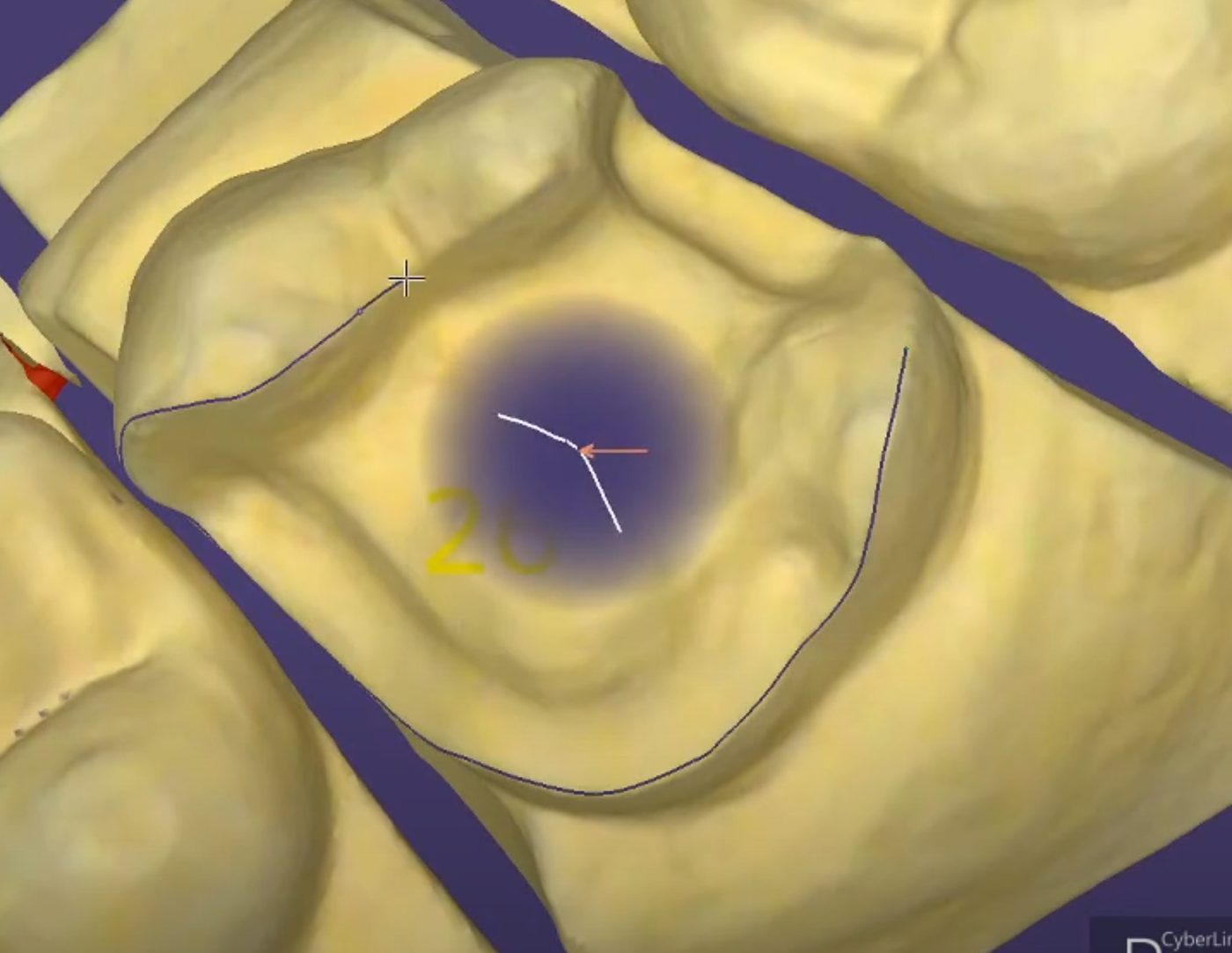
1. Margin line on the prepared tooth
We trace the preparation margin on the scanned die, so the crown will close precisely at the finish line.
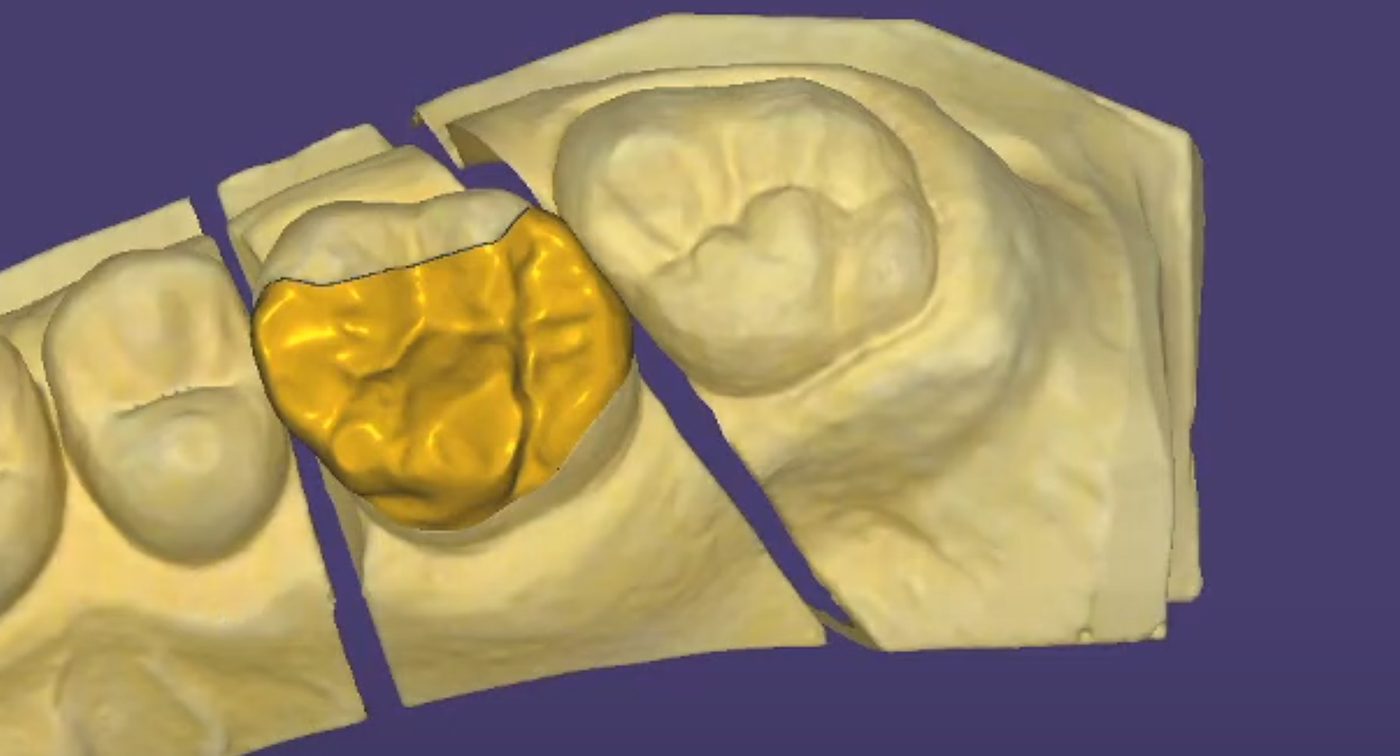
2. Crown proposal and anatomy
The crown is shaped to fit the space between the neighbouring teeth, with cusps and fissures matched to the patient's own anatomy.
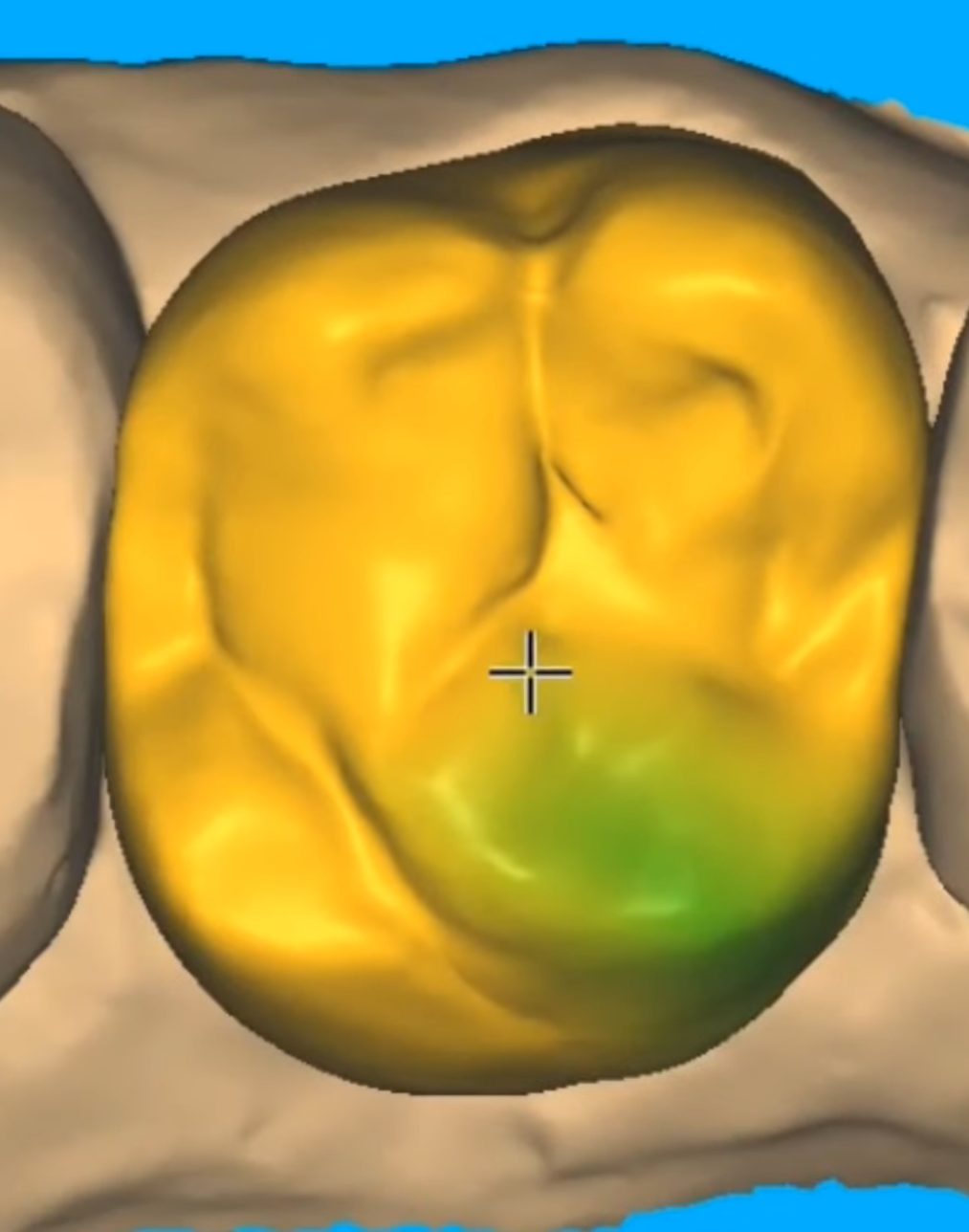
3. Occlusion checked against the antagonist
A colour contact map shows where the crown meets the opposing tooth, so the bite is adjusted on screen instead of chairside.
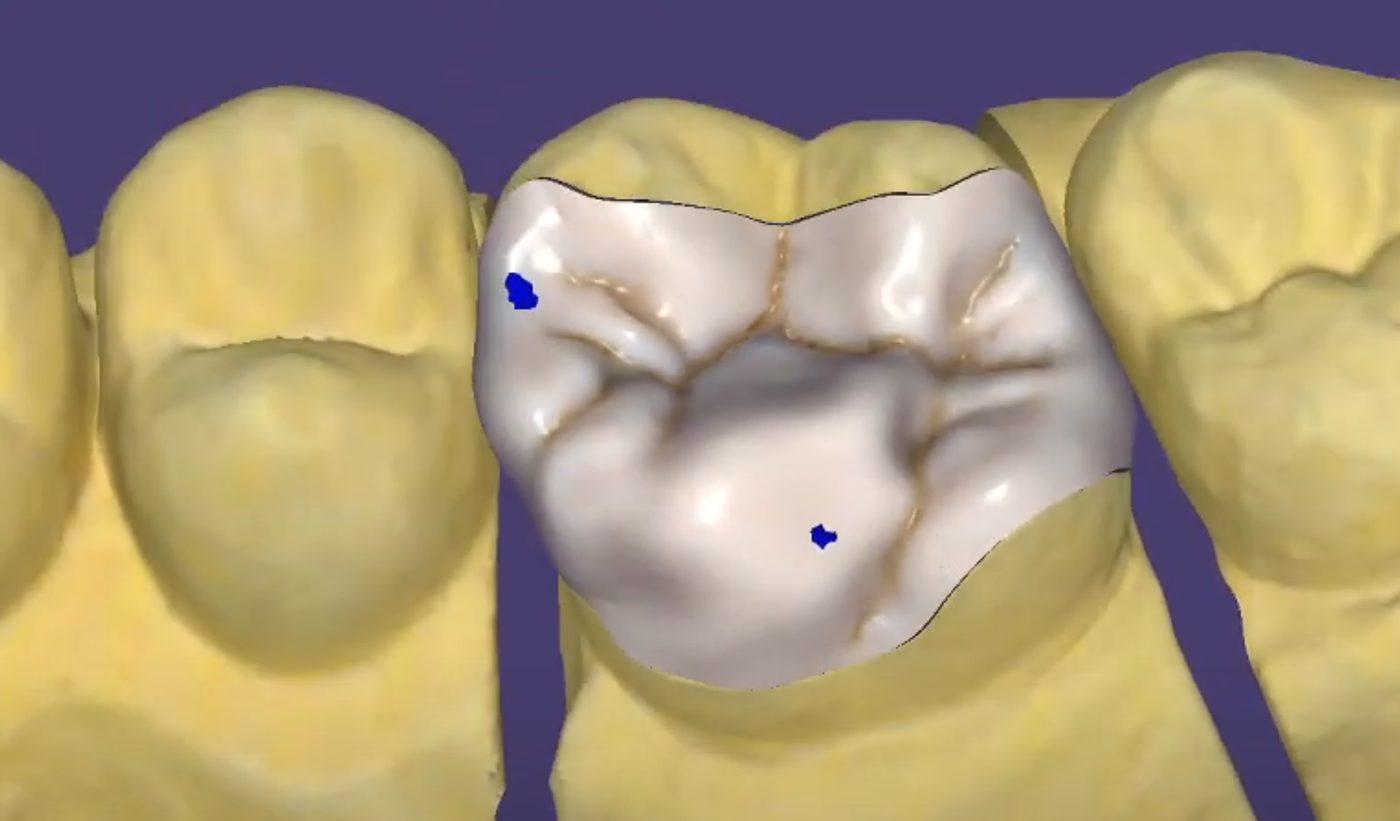
4. Final design ready for milling
Contacts, thickness and margins are checked one last time, then the STL file is sent to your mill or printer.
Crowns & Bridges design — frequently asked questions
- What files do you need to design a crown or bridge?
- An STL of the prepared arch, the antagonist and the bite. Patient photos and the chosen material and shade help us match anatomy and contacts.
- Can you design inlays, onlays and veneers as well?
- Yes. Inlays, onlays, veneers, single crowns and multi-unit bridges are all part of the crown and bridge workflow.
- How do you avoid chairside adjustments?
- Margins, proximal contacts and occlusion are checked against the antagonist before delivery, so the restoration seats with minimal grinding.
- Which scanner do I need to send you a crown case?
- Any intraoral or lab scanner that exports STL files. We design from the STL of the prepared arch, the antagonist and the bite, whatever scanner produced them.
- How do I send large scan files?
- Attach the files to an e-mail, or send a download link if they are too large. Add the tooth, material, shade and deadline in the same message.
- Do you design implant crowns too?
- Yes. Implant crowns are designed on the scan body position from your scan, and we can design the custom abutment in the same case.
- How long does crown and bridge design take?
- Routine cases are designed overnight. Complex or large cases can take longer, and we tell you the expected time when we confirm the case.
- How many revisions are included?
- Revisions are included until you approve the design. Additional redesigns caused by new clinical instructions may be quoted separately.
- Which software do you use, and what do I receive?
- We design in exocad and deliver the stl file, ready to send straight to your mill or printer.
Real cases from our desk
Crowns & Bridges design cases
A selection of crowns & bridges cases we designed for dental labs and clinics. Tap any image to see it full size.
Other design services
Fast, precise and customized results
Email us your case and scans and get a design quote. First case? We'll confirm turnaround before we start.
Prefer email? Send your files directly to info@dmdentaldesign.com.